

SEO keyword research tool has come a long way.
Sure, features like search volume, cost-per-click (CPC), and the number of competitors using the same keyword remain the same.
But the current SEO keyword tool can do so much more than finding the best keyword for your website.
For one, generating the prompt ideas based on your chosen keyword.
From there, you can create a blog post based on the prompt idea in the hope that the AI will cite what you write.
Another cool thing about the current SEO tool is that you can identify the search intent based on the keyword.
When you know the intent, it will be so much easier to optimize the page to get the outcome you want.
Think there’s no way an SEO tool can do something this sophisticated?
Well, guess what?
Ubersuggest can do all the things that I mention here.
A note about the SEO keyword research tool, Ubersuggest
As always, everything that I shared in this blog post is based on my experience with using the free version of Ubersuggest.
And that means I can’t do much with it, considering how limited the free version is.
So, what’s the point of using Ubersuggest when you’re limited to pretty much almost everything?
Believe it or not, you can actually get quite a lot out of the free version even with the limitations in place.
If there’s one tool that allows you to do this much with the free version alone, it will be Ubersuggest.
My thoughts about Ubersuggest
If your book marketing revolves around content marketing, then the prompt idea generation can be a wonderful feature for you.
But don’t discount the prompt idea generation just yet if you don’t do content marketing.
Try getting the response from the prompt suggestions and see what brands are being mentioned in the response.
Depending on the prompt, hopefully, the AI will mention your name and your book in the response.
But don’t feel bad if it doesn’t, since it’s not easy to get cited by the AI even if you do everything right.
Instead of fretting about the AI not citing you, I say optimize your website based on the search intent.
Let’s say you have a WooCommerce store and you want your target readers to buy directly from you.
All you need to do is to be sure that the keyword you pick is transactional, as in your target readers are already in the buying mode when they use the keyword.
As you can see here, Ubersuggest can classify the keyword into informational, commercial, transactional, and navigational.
This is what it looks like when I do keyword research for this post.
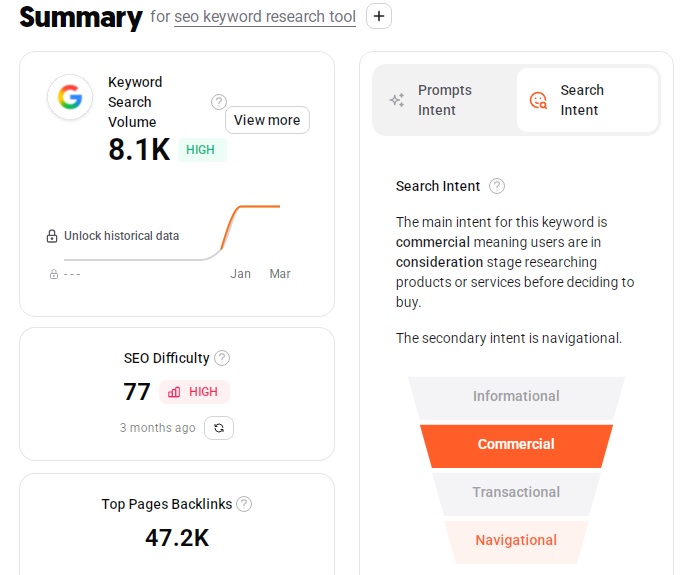
Of course, you’ll get a breakdown of that said keyword when you click on the View More, providing you with more details about the keyword.
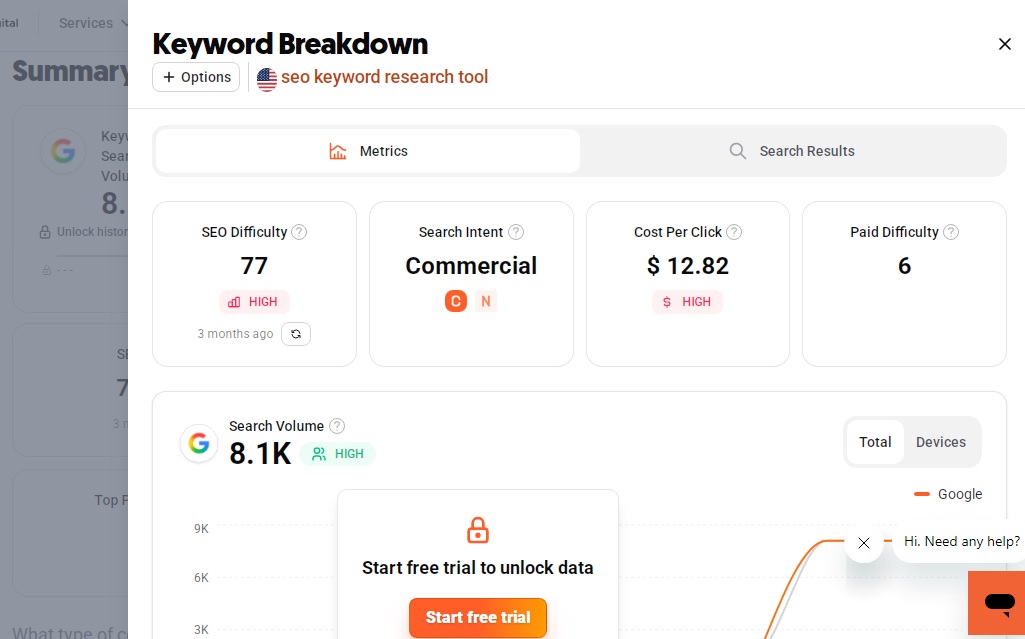
Unfortunately, this is the only information you can get with the free version.
The rest of the information will only be accessible if you sign up for the trial or if you have already upgraded to one of the paid plans.
But even without those details, optimizing your website will become so much easier when you know the search intent for the keyword you pick.
Optimize the page with a keyword that matches the search intent, and you’ll be way ahead of everybody else.
What you should know about Ubersuggest
Yes, it’s important to optimize your website with the keyword that matches the search intent.
But it’s also important to fix whatever errors you have on your website so that your website can rank better in the search results.
The good news is you don’t have to crack your head, wondering if there are errors on your website and how to fix them, thanks to the Site Audit feature.
All you have to do is let Ubersuggest crawl your website, and it will identify the errors you need to fix.
Okay, please ignore the last crawl date since I’m too lazy to update the screenshot to the recent one.
But the interface for the site audit remains the same, though.
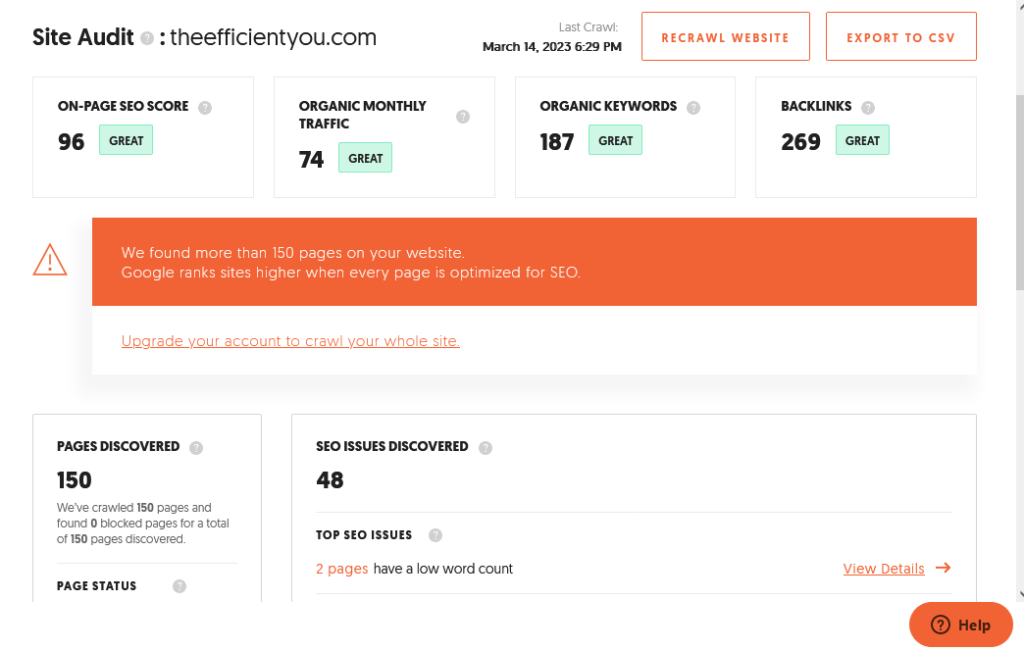
As you can tell, the crawler will only crawl up to 150 pages in the free version. So, you won’t be able to see any errors beyond the 150 pages that the crawler doesn’t crawl.
But it’s still better than not doing anything at all.
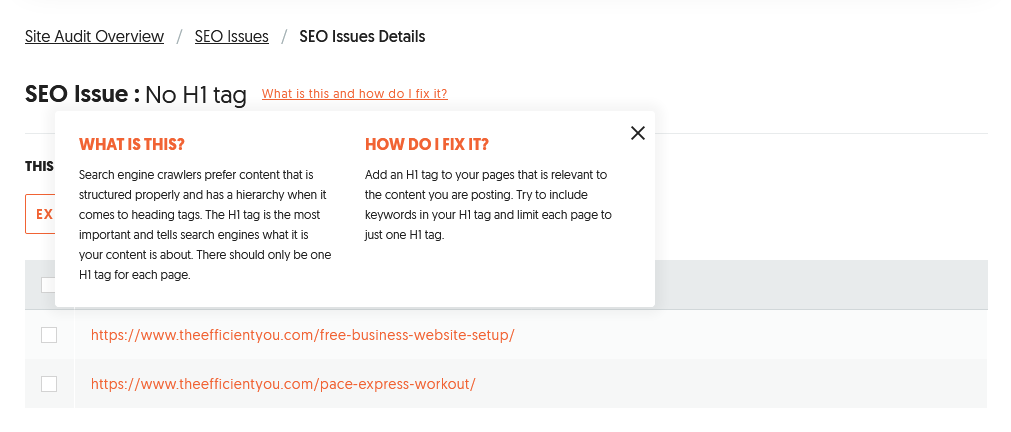
Think that you have no idea how to fix those errors? Ubersuggest even gives you an explanation of how you can fix the errors yourself.
If you have a hard time understanding the terms used in Ubersuggest, then I highly recommend that you have a look at the SEO Unlocked course.
What I love about the course is that it not only the course breaks down the SEO fundamentals and teaches you how to do the on-page SEO the right way.
But it also teaches you how to make full use of Ubersuggest and other tools such as Google Search Console.
And the best part of all? The course is free.
Who should be using Ubersuggest?
If you’ve been using the Google Keyword Planner but it feels like you’re missing something, then consider switching to Ubersuggest instead.
Not to throw shade on the Google Keyword Planner, but I find that the keywords I analyzed using the Google Keyword Planner don’t seem to perform as well as those analyzed using Ubersuggest.
As much as I’m not a fan of being limited to 3 daily searches, I still think that Ubersuggest is better than Google Keyword Planner.
Of course, don’t take my words for it.
Try Ubersuggest and see for yourself which one is better.
Besides, it’s also free to sign up, anyway.
You have nothing to lose by signing up with Ubersuggest.
Interested in giving Ubersuggest a test drive?
Well, you can sign up with Ubersuggest for free right here:
Will I be upgrading to the Ubersuggest paid plan?
Well, you bet I will, since SEO is my main strategy for driving traffic to my website, specifically to my WooCommerce store.
Yes, it’s pricey, for sure.
But if it can help with improving my websites for the better, then it’s all worth the investment.